 Easy Language Translator

ExamPix: Exam Photo Resizer
ExamPix resizes your exam form photo and signature to the exact KB, pixel size and format that Indian government job and entrance exam portals ask for: SSC, IBPS, SBI, UPSC, RRB, NEET, JEE, CUET and more.
Android

Not a government app: ExamPix is an independent app made by a private developer, AllLanguageTranslators. It is not affiliated with, endorsed by or representing any government entity, exam authority or recruitment board, including SSC, IBPS, SBI, UPSC, RRB, NTA and state PSCs. Fill and submit your form only on the official website.
ExamPix at a glance
- What it does
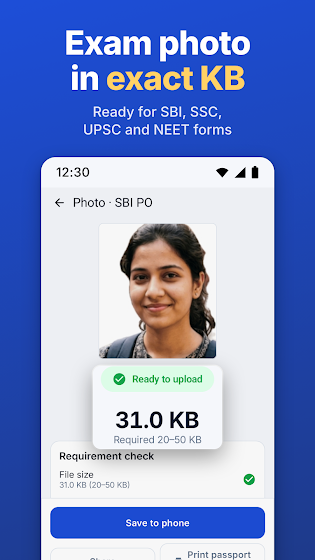
- Resizes exam form photos, signatures, thumb impressions and handwritten declarations to the exact KB, pixel size and format each exam asks for
- Exams with built-in sizes
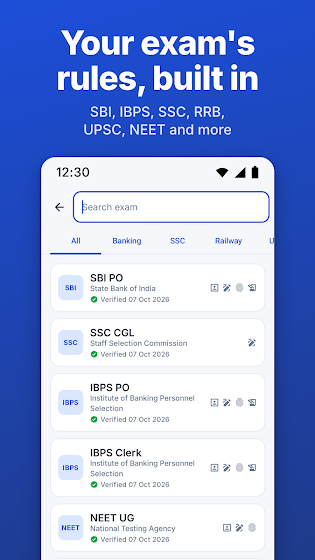
- 25: SBI, IBPS, SSC, RRB, UPSC, NEET, JEE Main, CUET UG, CTET, MPSC and RPSC exams, plus Custom size for any other form
- Where the sizes come from
- Each exam's official notification, linked in the app and in the table below; checked 7 October 2026 (MPSC and RPSC: 12 October 2026)
- Price
- Free with a small banner ad. One-time PRO purchase (₹99 on Google Play in India), no subscription
- Privacy
- Photos are processed on your phone and never uploaded. No sign-up. Works offline
- Languages
- English and Hindi (हिंदी)
- Platform
- Android, on Google Play
Screenshots
Features
- Exam photo resizer
- Signature resize
- Thumb impression
- Exam photo maker
- Handwritten declaration
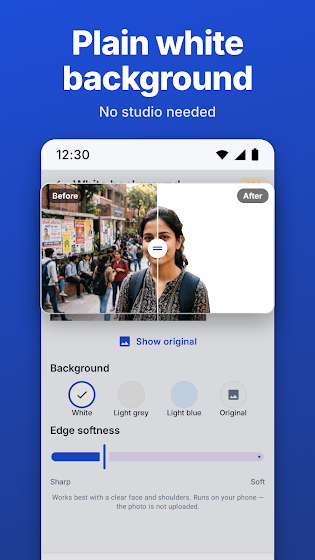
- White background
- Resize image to KB
- Custom size
- Passport size photo maker
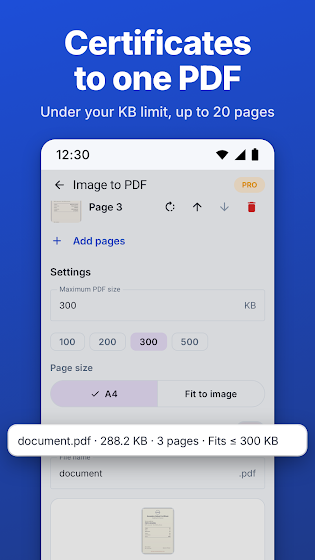
- Image to PDF under KB
- Save once, reuse
- Check before you upload
Who uses ExamPix: Exam Photo Resizer
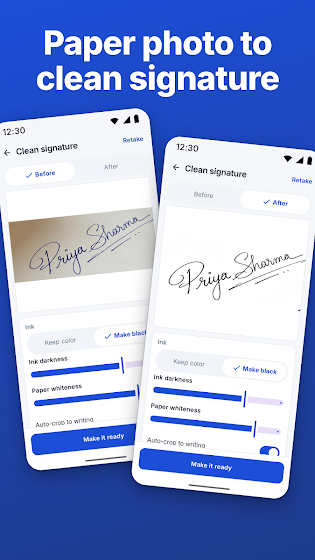
- An SSC CGL or CHSL applicant reduces a phone photo of their signature to 10–20 KB JPG.
- An IBPS PO or SBI Clerk applicant prepares all four files: photo 200 × 230 px, signature, left thumb impression and handwritten declaration.
- A NEET, JEE Main or CUET student gets a photo on a white background within the KB limit of the information bulletin.
- A student filling a college, scholarship or state job form enters the form's own size in Custom size.
How ExamPix works
- Pick your exam, or enter your own custom size.
- Take a photo, choose one from the gallery, or scan it on paper.
- ExamPix resizes the file and checks its KB size, dimensions and format against the requirement.
- Save or share the file, then upload it to the official application form.
Exam photo and signature sizes
These are the sizes built into ExamPix, taken from each exam's official notification. Exam rules change: always check the official notification linked below before you submit.
Banking exams (SBI, IBPS) · SSC exams · Railway exams (RRB) · UPSC exams · Entrance exams (NTA) · Teaching exams · State PSC exams
Banking exams (SBI, IBPS)
For SBI PO, SBI Clerk, IBPS PO, IBPS Clerk, IBPS RRB and IBPS SO, the photo is 200 × 230 pixels and 20–50 KB (JPG) on a light, preferably white, background. The signature is 140 × 60 pixels and 10–20 KB, the left thumb impression 240 × 240 pixels and 20–50 KB, and the handwritten declaration 800 × 400 pixels and 50–100 KB, all scanned at 200 DPI. The form also takes a live photo on the portal.
| Exam | File | Format | File size | Dimensions | Background / notes |
|---|---|---|---|---|---|
| SBI PO | Photo | JPG | 20–50 KB | 200 × 230 px at 200 DPI | Light, preferably white background |
| Signature | JPG | 10–20 KB | 140 × 60 px at 200 DPI | White background | |
| Left thumb impression | JPG | 20–50 KB | 240 × 240 px at 200 DPI | White background | |
| Handwritten declaration | JPG | 50–100 KB | 800 × 400 px at 200 DPI | White background | |
| IBPS PO | Photo | JPG | 20–50 KB | 200 × 230 px at 200 DPI | Light, preferably white background |
| Signature | JPG | 10–20 KB | 140 × 60 px at 200 DPI | White background | |
| Left thumb impression | JPG | 20–50 KB | 240 × 240 px at 200 DPI | White background | |
| Handwritten declaration | JPG | 50–100 KB | 800 × 400 px at 200 DPI | White background | |
| IBPS Clerk | Photo | JPG | 20–50 KB | 200 × 230 px at 200 DPI | Light, preferably white background |
| Signature | JPG | 10–20 KB | 140 × 60 px at 200 DPI | White background | |
| Left thumb impression | JPG | 20–50 KB | 240 × 240 px at 200 DPI | White background | |
| Handwritten declaration | JPG | 50–100 KB | 800 × 400 px at 200 DPI | White background | |
| SBI Clerk | Photo | JPG | 20–50 KB | 200 × 230 px at 200 DPI | Light, preferably white background |
| Signature | JPG | 10–20 KB | 140 × 60 px at 200 DPI | White background | |
| Left thumb impression | JPG | 20–50 KB | 240 × 240 px at 200 DPI | White background | |
| Handwritten declaration | JPG | 50–100 KB | 800 × 400 px at 200 DPI | White background | |
| IBPS RRB | Photo | JPG | 20–50 KB | 200 × 230 px at 200 DPI | Light, preferably white background |
| Signature | JPG | 10–20 KB | 140 × 60 px at 200 DPI | White background | |
| Left thumb impression | JPG | 20–50 KB | 240 × 240 px at 200 DPI | White background | |
| Handwritten declaration | JPG | 50–100 KB | 800 × 400 px at 200 DPI | White background | |
| IBPS SO | Photo | JPG | 20–50 KB | 200 × 230 px at 200 DPI | Light, preferably white background |
| Signature | JPG | 10–20 KB | 140 × 60 px at 200 DPI | White background | |
| Left thumb impression | JPG | 20–50 KB | 240 × 240 px at 200 DPI | White background | |
| Handwritten declaration | JPG | 50–100 KB | 800 × 400 px at 200 DPI | White background |
Official sources for Banking exams (SBI, IBPS)
- SBI PO: State Bank of India official document (18 Jun 2026), checked 7 Oct 2026
- IBPS PO: Institute of Banking Personnel Selection official document (30 Jun 2026), checked 7 Oct 2026
- IBPS Clerk: Institute of Banking Personnel Selection official document (1 Aug 2026), checked 7 Oct 2026
- SBI Clerk: State Bank of India official document (11 Aug 2026), checked 7 Oct 2026
- IBPS RRB: Institute of Banking Personnel Selection official document (1 Sep 2026), checked 7 Oct 2026
- IBPS SO: Institute of Banking Personnel Selection official document (30 Jun 2026), checked 7 Oct 2026
SSC exams
For SSC CGL, CHSL, MTS, GD Constable and CPO you upload only the signature: a JPG of 10–20 KB. The photo is taken live on the SSC portal. SSC GD asks for a signature of about 6.0 × 2.0 cm at 300 DPI.
| Exam | File | Format | File size | Dimensions | Background / notes |
|---|---|---|---|---|---|
| SSC CGL | Signature | JPG | 10–20 KB | Not fixed (keeps your image's proportions) | – |
| SSC CHSL | Signature | JPG | 10–20 KB | Not fixed (keeps your image's proportions) | – |
| SSC MTS | Signature | JPG | 10–20 KB | Not fixed (keeps your image's proportions) | – |
| SSC GD Constable | Signature | JPG | 10–20 KB | 6.0 × 2.0 cm at 300 DPI | – |
| SSC CPO | Signature | JPG | 10–20 KB | Not fixed (keeps your image's proportions) | – |
Some SSC notices give the signature as 6.0 × 2.0 cm in one place and 4.0 × 2.0 cm in another, without a DPI, so ExamPix keeps your signature's proportions and enforces the 10–20 KB limit.
Official sources for SSC exams
- SSC CGL: Staff Selection Commission official document (21 May 2026), checked 7 Oct 2026
- SSC CHSL: Staff Selection Commission official document (7 Sep 2026), checked 7 Oct 2026
- SSC MTS: Staff Selection Commission official document (26 Jun 2025), checked 7 Oct 2026
- SSC GD Constable: Staff Selection Commission official document (1 Dec 2025), checked 7 Oct 2026
- SSC CPO: Staff Selection Commission official document (10 Sep 2026), checked 7 Oct 2026
Railway exams (RRB)
For RRB NTPC (Graduate and Undergraduate), Group D, ALP and JE you upload only the signature: a JPG of 30–49 KB, scanned at a minimum of 100 DPI on a white background and at least 140 × 60 pixels. The photo is taken live on the portal.
| Exam | File | Format | File size | Dimensions | Background / notes |
|---|---|---|---|---|---|
| RRB NTPC (Graduate) | Signature | JPG | 30–49 KB | Not fixed (keeps your image's proportions); scan at 100 DPI or more | White background |
| RRB NTPC (Undergraduate) | Signature | JPG | 30–49 KB | Not fixed (keeps your image's proportions); scan at 100 DPI or more | White background |
| RRB Group D | Signature | JPG | 30–49 KB | Not fixed (keeps your image's proportions); scan at 100 DPI or more | White background |
| RRB ALP | Signature | JPG | 30–49 KB | Not fixed (keeps your image's proportions); scan at 100 DPI or more | White background |
| RRB JE | Signature | JPG | 30–49 KB | Not fixed (keeps your image's proportions); scan at 100 DPI or more | White background |
Official sources for Railway exams (RRB)
- RRB NTPC (Graduate): Railway Recruitment Boards official document (21 Oct 2025), checked 7 Oct 2026
- RRB NTPC (Undergraduate): Railway Recruitment Boards official document (28 Oct 2025), checked 7 Oct 2026
- RRB Group D: Railway Recruitment Boards official document (31 Jan 2026), checked 7 Oct 2026
- RRB ALP: Railway Recruitment Boards official document (15 May 2026), checked 7 Oct 2026
- RRB JE: Railway Recruitment Boards official document (14 Aug 2026), checked 7 Oct 2026
UPSC exams
For UPSC Civil Services (IAS), NDA and CDS, the photo is a JPG of 20–200 KB on a plain white background, with your face covering at least 75% of it. The signature is a JPG of 20–100 KB, 350–500 pixels in width and height, signed three times one below the other, as UPSC's instructions ask.
| Exam | File | Format | File size | Dimensions | Background / notes |
|---|---|---|---|---|---|
| UPSC Civil Services | Photo | JPG | 20–200 KB | Not fixed (keeps your image's proportions) | White background; face covers at least 75% of the photo |
| Signature (three times, one below the other) | JPG | 20–100 KB | 350–500 × 350–500 px | White background | |
| UPSC NDA | Photo | JPG | 20–200 KB | Not fixed (keeps your image's proportions) | White background; face covers at least 75% of the photo |
| Signature (three times, one below the other) | JPG | 20–100 KB | 350–500 × 350–500 px | White background | |
| UPSC CDS | Photo | JPG | 20–200 KB | Not fixed (keeps your image's proportions) | White background; face covers at least 75% of the photo |
| Signature (three times, one below the other) | JPG | 20–100 KB | 350–500 × 350–500 px | White background |
Official sources for UPSC exams
- UPSC Civil Services: Union Public Service Commission official document (4 Feb 2026), checked 7 Oct 2026
- UPSC NDA: Union Public Service Commission official document (4 Feb 2026), checked 7 Oct 2026
- UPSC CDS: Union Public Service Commission official document (4 Feb 2026), checked 7 Oct 2026
Entrance exams (NTA)
For NEET UG, JEE Main and CUET UG, the photo is a JPG of 10–200 KB on a white background, with about 80% of the image showing your face. The signature is 10–100 KB (10–50 KB for CUET UG). NEET UG also asks for a fingers-and-thumb image. A live photo is also captured during the application.
| Exam | File | Format | File size | Dimensions | Background / notes |
|---|---|---|---|---|---|
| NEET UG | Photo | JPG | 10–200 KB | Not fixed (keeps your image's proportions) | White background; face covers at least 80% of the photo |
| Signature | JPG | 10–100 KB | Not fixed (keeps your image's proportions) | – | |
| Left & right hand fingers and thumb impressions | JPG | 50–200 KB | Not fixed (keeps your image's proportions) | – | |
| JEE Main | Photo | JPG | 10–200 KB | Not fixed (keeps your image's proportions) | White background; face covers at least 80% of the photo |
| Signature | JPG | 10–100 KB | Not fixed (keeps your image's proportions) | – | |
| CUET UG | Photo | JPG | 10–200 KB | Not fixed (keeps your image's proportions) | White background; face covers at least 80% of the photo |
| Signature | JPG | 10–50 KB | Not fixed (keeps your image's proportions) | – |
The NEET UG bulletin gives two ranges for the fingers-and-thumb image (10–200 KB and 50–300 KB). ExamPix uses 50–200 KB, which meets both.
Official sources for Entrance exams (NTA)
- NEET UG: National Testing Agency official document (23 Feb 2026), checked 7 Oct 2026
- JEE Main: National Testing Agency official document (2 Nov 2025), checked 7 Oct 2026
- CUET UG: National Testing Agency official document (3 Jan 2026), checked 7 Oct 2026
Teaching exams
For CTET, the photo is a JPG of 10–100 KB, about 3.5 × 4.5 cm, and the signature 3–30 KB, about 3.5 × 1.5 cm.
| Exam | File | Format | File size | Dimensions | Background / notes |
|---|---|---|---|---|---|
| CTET | Photo | JPG | 10–100 KB | Not fixed (keeps your image's proportions) | – |
| Signature | JPG | 3–30 KB | Not fixed (keeps your image's proportions) | – |
Official sources for Teaching exams
- CTET: Central Board of Secondary Education official document (11 May 2026), checked 7 Oct 2026
State PSC exams
For MPSC Rajyaseva, the photo and signature are JPGs of up to 50 KB each, 3.5 × 4.5 cm and 3.5 × 1.5 cm at 200 DPI. For RPSC RAS/RTS, the signature (in Hindi or English) and the left thumb impression are JPGs of 20–50 KB each.
| Exam | File | Format | File size | Dimensions | Background / notes |
|---|---|---|---|---|---|
| MPSC Rajyaseva (State Services) | Photograph | JPG | up to 50 KB | 3.5 × 4.5 cm at 200 DPI | – |
| Signature | JPG | up to 50 KB | 3.5 × 1.5 cm at 200 DPI | – | |
| RPSC RAS/RTS | Signature (Hindi or English) | JPG | 20–50 KB | Not fixed (keeps your image's proportions) | – |
| Left thumb impression | JPG | 20–50 KB | Not fixed (keeps your image's proportions) | – |
Official sources for State PSC exams
- MPSC Rajyaseva (State Services): Maharashtra Public Service Commission official document (21 May 2021), checked 12 Oct 2026
- RPSC RAS/RTS: Rajasthan Public Service Commission official document (19 May 2026), checked 12 Oct 2026
ExamPix compared with other ways to resize
| ExamPix | Online resize website | Cyber café | General photo editor | |
|---|---|---|---|---|
| Knows each exam's KB and pixel size | Yes, 25 exams built in | No, you look up the size yourself | Depends on the operator | No |
| Checks the file before you upload | Yes: KB, dimensions, format | Usually only the file size | Depends on the operator | No |
| Your photo stays on your phone | Yes, processed on the phone | Usually no: most upload the photo to their server | No, you hand over your documents | Yes |
| Works offline | Yes | No | No | Usually yes |
| Thumb impression and handwritten declaration | Yes, with the declaration text filled in | No | Sometimes | No |
| Cost | Free with ads, or ₹99 once for PRO | Usually free with ads | Paid each visit | Varies |
ExamPix हिंदी में
ExamPix आपकी फोटो और सिग्नेचर को ठीक उसी KB, पिक्सल साइज़ और फॉर्मेट में बदलता है जो सरकारी नौकरी और प्रवेश परीक्षा के पोर्टल माँगते हैं: SSC, IBPS, SBI, UPSC, RRB, NEET, JEE, CUET और भी। अपनी परीक्षा चुनें और ExamPix फॉर्म की हर फाइल तैयार करेगा: फोटो, सिग्नेचर, अंगूठे का निशान (Thumb Impression) और हाथ से लिखा घोषणा-पत्र।
फोटो आपके फोन पर ही प्रोसेस होती हैं, कहीं अपलोड नहीं होतीं। ऐप ऑफ़लाइन चलता है और पूरा ऐप हिंदी और अंग्रेज़ी में है।
सरकारी ऐप नहीं: ExamPix एक निजी डेवलपर का स्वतंत्र ऐप है। यह किसी सरकारी संस्था, परीक्षा प्राधिकरण या भर्ती बोर्ड से जुड़ा नहीं है। फॉर्म केवल आधिकारिक वेबसाइट पर ही भरें और जमा करें।
Price
Free with a small banner ad. PRO tools can be used once by watching a short video. Buy PRO once (no subscription; ₹99 on Google Play in India) to remove ads and unlock unlimited history, Auto-prepare, White background, the print sheet and Image to PDF.
Questions about ExamPix: Exam Photo Resizer
What is the photo and signature size for SBI PO and IBPS exams?
Photo: 200 × 230 pixels, 20–50 KB, JPG, on a light (preferably white) background. Signature: 140 × 60 pixels, 10–20 KB. Left thumb impression: 240 × 240 pixels, 20–50 KB. Handwritten declaration: 800 × 400 pixels, 50–100 KB. All at 200 DPI. Source: the official SBI and IBPS 2026 notifications, checked 7 October 2026.
What is the signature size for SSC CGL, CHSL, MTS, GD and CPO?
A JPG of 10–20 KB. The photo is taken live on the SSC portal, so the signature is the only image you upload. SSC GD also gives about 6.0 × 2.0 cm at 300 DPI. Source: the official SSC notices, checked 7 October 2026.
What is the RRB NTPC, Group D, ALP and JE signature size?
A JPG of 30–49 KB, scanned at a minimum of 100 DPI on a white background, at least 140 × 60 pixels. The photo is taken live on the portal. Source: the official RRB CEN notices, checked 7 October 2026.
What is the UPSC photo and signature size?
Photo: JPG, 20–200 KB, plain white background, face covering at least 75% of the photo. Signature: JPG, 20–100 KB, 350–500 pixels in width and height, signed three times. Source: UPSC's instructions for uploading the photo and signature on upsconline.nic.in, checked 7 October 2026.
What is the NEET UG, JEE Main and CUET UG photo size?
A JPG of 10–200 KB on a white background, with about 80% of the image showing the face. The signature is 10–100 KB (10–50 KB for CUET UG). Source: the official NTA information bulletins, checked 7 October 2026.
How do I resize a photo to 20 KB or 50 KB?
In ExamPix, pick your exam and the app resizes the photo to that exam's KB range and pixel size. For any other form, open Resize image to KB or Custom size, enter the KB limit, and save the result.
Is ExamPix an official government app?
No. ExamPix is an independent app by a private developer, AllLanguageTranslators. It is not affiliated with SSC, IBPS, SBI, UPSC, RRB, NTA or any state PSC. Fill and submit your form only on the official website.
Are my photos uploaded anywhere?
No. ExamPix processes photos on your phone and never uploads them. There is no sign-up, and the app works offline.
Is ExamPix free?
Yes, it is free with a small banner ad. PRO tools can be used once by watching a short video. A one-time PRO purchase (₹99 on Google Play in India, no subscription) removes ads and unlocks unlimited history, Auto-prepare, White background, the print sheet and Image to PDF.
My exam is not in the list. Can I still use ExamPix?
Yes. Use Custom size to enter your own width and height (px, cm or inch), KB range and JPG or PNG, for college, scholarship or any online application form. You can also request the exam from inside the app.
Exam rules change. How do I know a size is still correct?
Every size in ExamPix comes from the exam's official notification, and each exam links to it. Always check the official notification before you submit. If something looks wrong, use "Report a wrong requirement" in the app.
Is ExamPix: Exam Photo Resizer available on iPhone?
No. ExamPix: Exam Photo Resizer is an Android app, available on Google Play.
Who makes ExamPix: Exam Photo Resizer?
AllLanguageTranslators, which publishes 89 Android apps on Google Play, mostly translators for Indian languages. About us.
Related apps



Developer
ExamPix: Exam Photo Resizer is made by AllLanguageTranslators. Support: talkandtranslate@gmail.com. Privacy policy. View on Google Play.